Coming Soon on Google Play · Android & Samsung S Pen
HeroNote App Icon

HeroNote

A little space for big ideas.

Most note apps lock your handwriting behind monthly fees and cloud accounts. HeroNote gives you fast, zero-lag S Pen ink, real-paper finger smudging you can draw right over, built-in PDF annotation with E-Reader Mode, 8 paper stocks (including Sheet Music, Guitar Tab & Account Ledger), offline handwriting word search, and one-time ownership on Google Play.

Coming soon on Google Play
Explore Features
✓ No account or subscription ✓ On-device handwriting search ✓ Free to start (1 notebook, 5 pages)
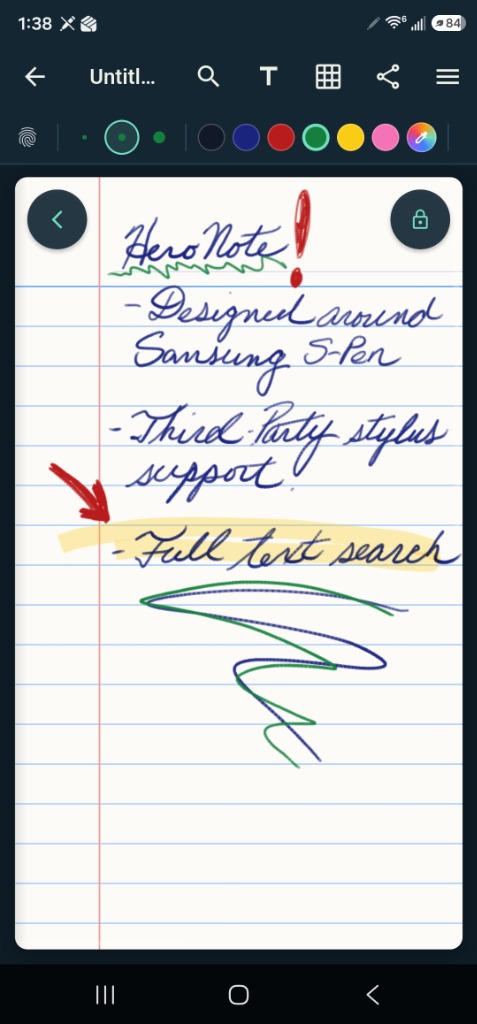
HeroNote Android app screenshot showing handwritten S Pen notes, yellow highlight, and compact drawing toolbar
HeroNote on Android — S Pen ink, highlighter & movable page arrows
$0 / month $7.99 USD intro promo ($24.99 USD reg.)
100% On-Device Offline handwriting word search
PDFs + 8 Papers E-Reader Mode, Music, Tab & Ledger
Zero Account Lock-In Local, Drive & OneDrive backups
What Sets HeroNote Apart

Thoughtful details other note apps forgot

Built around how people actually write, sketch, and find notes on Android tablets — without bloated cloud suites or endless monthly bills.

Offline Word Search

Search every word you write — even handwritten ones

Search across all notebooks or inside the open book. HeroNote indexes page headers, body handwriting, sticky notes, and editable text boxes locally on your device — jumping straight to the matching page while keeping locked notebooks hidden. Smart Table of Contents entries generate automatically only for pages that have header text.

Fast Two-Layer Ink & S Pen

Hold S Pen to erase. Double-click for Correction Pen.

Built on a lag-free two-layer ink and highlighter engine: write or highlight smoothly without frame drops, smudge ink by default with a finger in S Pen mode, fine-tune Custom Brush Size (0.8–18 px), or hold the S Pen button to slice with Piece Eraser. Double-click the S Pen button — or tap the toolbar button — to swap to your custom-color Correction Pen and back.

  • Automatic S Pen dock detection + persistent manual Touch mode toggle
  • Draw crisply over smudged graphite & deselected page images
  • Soft, soothing procedural paper & writing sound effects
PDFs, Photos & Text Boxes

Annotate PDFs in E-Reader Mode & build visual pages

Import PDFs into their own dedicated PDFs library tab for reading and markup. Toggle E-Reader Mode to fit pages cleanly to your screen and hide PDF header lines. Drop in photos from your camera or gallery on pages and covers — tap outside a photo to write right over it, or add movable, resizable Text Boxes.

  • Dedicated Notebooks | PDFs library switcher & E-Reader Mode
  • Gallery & camera photos on pages + full custom cover photos
  • Editable Text Boxes & sticky notes included in word search
Ergonomic Controls & Ownership

Flip by edge swipe. Print or back up without accounts.

Double-tap a notebook title or use the menu to rename it, swipe near the page edges to turn sheets, hold-and-drag page arrows down out of your way, and jump straight to Settings from the page menu. Print notebooks straight from Android, or back up editable .heronote files to Local storage, Google Drive, or OneDrive.

  • Print Notebook option in both Library card & Editor menus
  • Local, Google Drive & OneDrive backups with zero complex OAuth
  • Master PIN + fingerprint / face unlock for private notebooks
Full Feature Suite

Everything you expect from paper — plus digital superpowers

Designed for S Pen, USI styluses, and capacitive pens across Android phones and tablets (Android 7.0 to Android 16+).

8 Paper Stocks & Custom Tints

College Ruled, Wide Ruled, Graph Paper, Handwriting Guides, Drawing Paper, plus Sheet Music, Guitar Tab & Account Ledger — with custom page colors and Dark Paper.

Fast Ink, Correction Pen & Brush Slider

Lag-free Pencil, Ballpoint, Marker & Highlighter, dedicated Correction Pen (toolbar + S Pen double-click), S Pen hold-to-erase, Custom Brush Size, Piece Eraser & Finger Smudge.

PDF Markup & E-Reader Mode

Import PDFs into a separate Library tab, draw or highlight directly over pages, snap pages to your screen in E-Reader Mode, and toggle PDF header sections anytime.

Photos, Cover Images & Text Boxes

Insert Gallery or Camera photos onto pages and covers — tap outside to deselect and write right on top — alongside movable, resizable Text Boxes and Sticky Notes.

Offline Search, Header TOC & Navigation

Search headers, handwriting, sticky notes & text boxes offline. TOC indexes only pages with header text, plus bezel edge swipes, movable page arrows, and quick double-tap notebook rename.

Direct Print, Cloud Backups & Lock

Print notebooks right from the Library or Editor menu, export PDFs or ZIP archives, back up editable .heronote files to Local, Google Drive or OneDrive, and lock with Biometrics or PIN.

Side-by-Side

How HeroNote compares to typical note apps

Keep your money, keep your privacy, and get tools built specifically for real tablet handwriting.

Capability HeroNote (Android) Typical Subscription Note Apps
Pricing Model Start free + $7.99 USD intro promo ($24.99 USD regular, pay once) Recurring monthly or yearly subscription
Handwriting Word Search 100% on-device & offline Cloud upload or gated behind higher tiers
Specialty Paper Stocks 8 stocks incl. Sheet Music, Guitar Tab & Ledger Basic lined/grid sheets or paid templates
PDF Markup & Reader Dedicated PDFs tab + Fit-to-Screen E-Reader Mode Paywalled PDF tools or clunky scrolling
S Pen Button & Dock Smarts Hold = Eraser · Double-click = Correction Pen · Auto dock Single button action & no dock awareness
Photos & Layered Ink Draw right over deselected photos & smudges Images block strokes or stay trapped in foreground
Movable Page Arrows Hold & slide down + edge-swipe page flipping Fixed buttons covering top corners
Privacy & Accounts Zero sign-in required; PIN & biometric lock Account creation & telemetry required
Printing, Backups & Exports Direct Print + Local, Drive & OneDrive .heronote & ZIP PDFs Proprietary sync or limited export options
No Subscriptions. Ever.

Try every tool free. Pay once if you need unlimited pages.

Unlike subscription note apps that charge every year just to keep writing, HeroNote unlocks unlimited notebooks and pages with a single Google Play purchase.

Free

HeroNote Starter

Free

Test the full stylus, smudge, piece eraser, and search engine with zero time limit.

  • ✓1 full digital notebook
  • ✓Up to 5 pages per notebook
  • ✓All 8 paper types (incl. Sheet Music, Guitar Tab & Ledger), PDFs, images, text boxes & sticky notes
  • ✓On-device word search, direct printing, header-only TOC & notebook lock
Coming Soon on Google Play
Questions

Frequently Asked Questions

HeroNote is coming soon to Google Play for Android phones and tablets running Android 7.0 (API 24) through Android 16+, including 16 KB memory-page tablets and Samsung S Pen devices.

Done paying rent on your own notes?

HeroNote is coming soon to Google Play — start free, write, smudge, search offline, and unlock once with the $7.99 USD intro promo ($24.99 USD regular).

Coming soon on Google Play